

Administering access rights within Typelane
Within Typelane you can easily invite other members of your HR or IT team to help manage journeys and kick-start onboardings.
How to invite and admin to the product
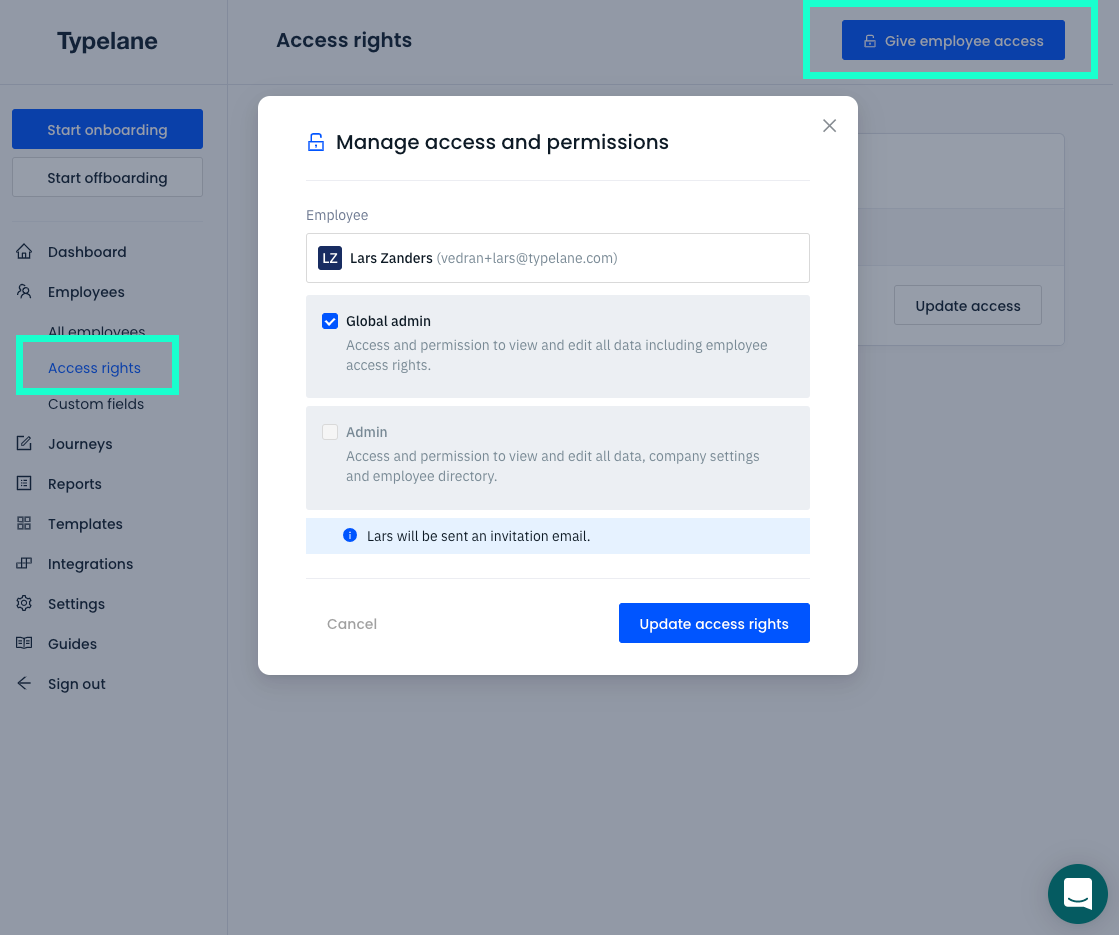
Section titled “How to invite and admin to the product”To invite a team member to the Typelane interface you simply:
- Navigate to Employees
- Select Access rights
- Click Give employee access
Which access level to give an admin?
Section titled “Which access level to give an admin?”There are two access levels within Typelane depending on your need.
Global Admin - Has full access rights and can make all changes, see all information and close down the account.
Admin - Has full access, can see all information with the exception of fields that are marked to be visible only to global admins. You can read more about it here. An admin is also restricted when it comes to changing tiers as well as closing the account.
How do I revoke admin access?
Section titled “How do I revoke admin access?”If you would like to revoke an employees access you simply go to access rights. Find the employee in the view and press “update access rights”. Remember that revoking access for an admin does not delete them. This is something that needs to be done after revoking access.